Custom COA systems for peptide WordPress and WooCommerce stores.
PeptideWP builds COA and document systems for peptide websites that need cleaner product-page certificates, easier file matching, batch and date visibility, admin import workflows, searchable document access, and private plugin logic that works with WooCommerce.
- Built for peptide research brands that need COAs to look professional, stay findable, and appear in the right product areas.
- Supports product matching, dated files, batch notes, PDF links, front-end displays, admin uploads, import workflows, and product-page trust blocks.
- Turns messy document handling into a repeatable system instead of relying on manual links, random media uploads, or fragile theme edits.
Most peptide COA setups are messy, manual, or invisible until something breaks.
A lot of peptide websites handle COAs with basic media uploads, product description links, random buttons, manually pasted PDFs, or naming rules nobody follows after the first week. That may work for a small catalog, but it gets painful fast when new batches, new products, renamed files, duplicate strengths, and old documents start stacking up.
The real issue is not just uploading a PDF. The real issue is keeping the certificate connected to the correct product, showing it in a professional place, making it easy for customers to find, and giving the admin team a workflow they can actually repeat.
A cleaner COA manager that becomes part of the store system.
- Display product-specific COAs directly on WooCommerce product pages.
- Show document dates, lot numbers, product names, batch notes, or custom labels.
- Import or upload files with rules that match your product catalog.
- Create a searchable COA lookup page for customers and internal support.
- Package the logic as a private plugin instead of burying it in theme snippets.
A COA system can be simple, advanced, or fully custom.
Some peptide brands only need a cleaner product-page COA area. Others need bulk import, dated matching, admin dashboards, searchable public lookup, product injection, automatic latest-file display, and custom WooCommerce logic.
Product-page COA display
Place certificates where buyers expect them without cluttering the whole product description.
- Under product images
- Inside product tabs
- Trust-card layouts
- Download or view buttons
File matching rules
Match COA files to products by SKU, slug, product name, strength, batch, or custom naming structure.
- SKU matching
- Product slug matching
- Strength-aware matching
- Fallback manual override
Date and batch handling
Make document recency obvious so customers and staff know which certificate is current.
- COA date display
- Lot or batch labels
- Latest file priority
- Archive older documents
Admin import workflow
Give the team a cleaner path for adding new documents without rebuilding product pages every time.
- Bulk upload support
- Import validation
- Need-attention lists
- Missing match reporting
Searchable COA lookup
Create a front-end document lookup page for users who want to search by product, SKU, or lot.
- Product search
- Batch search
- Filtered document cards
- Mobile-friendly layout
Private plugin build
For serious stores, the COA system can live inside a dedicated plugin with settings and future-proof structure.
- Theme-safe output
- Admin settings
- Reusable components
- Cleaner maintenance path
Show the actual system buyers care about: searchable COAs and product-page documents.
The point is not a fake dashboard mockup. The point is a real front-end experience: a COA library that is easy to scan, and a product-page section that makes the current certificate obvious without cluttering the purchase flow.
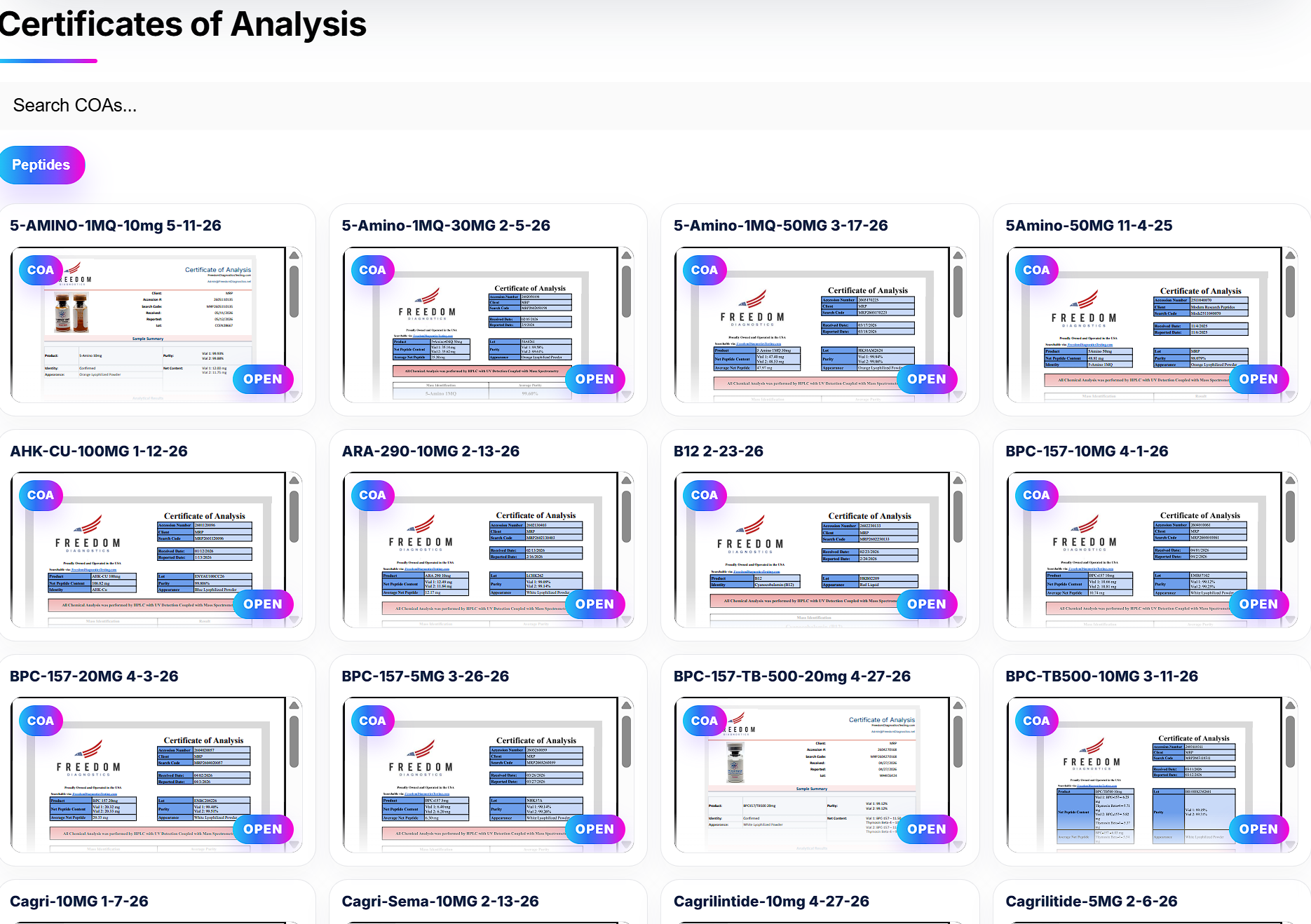
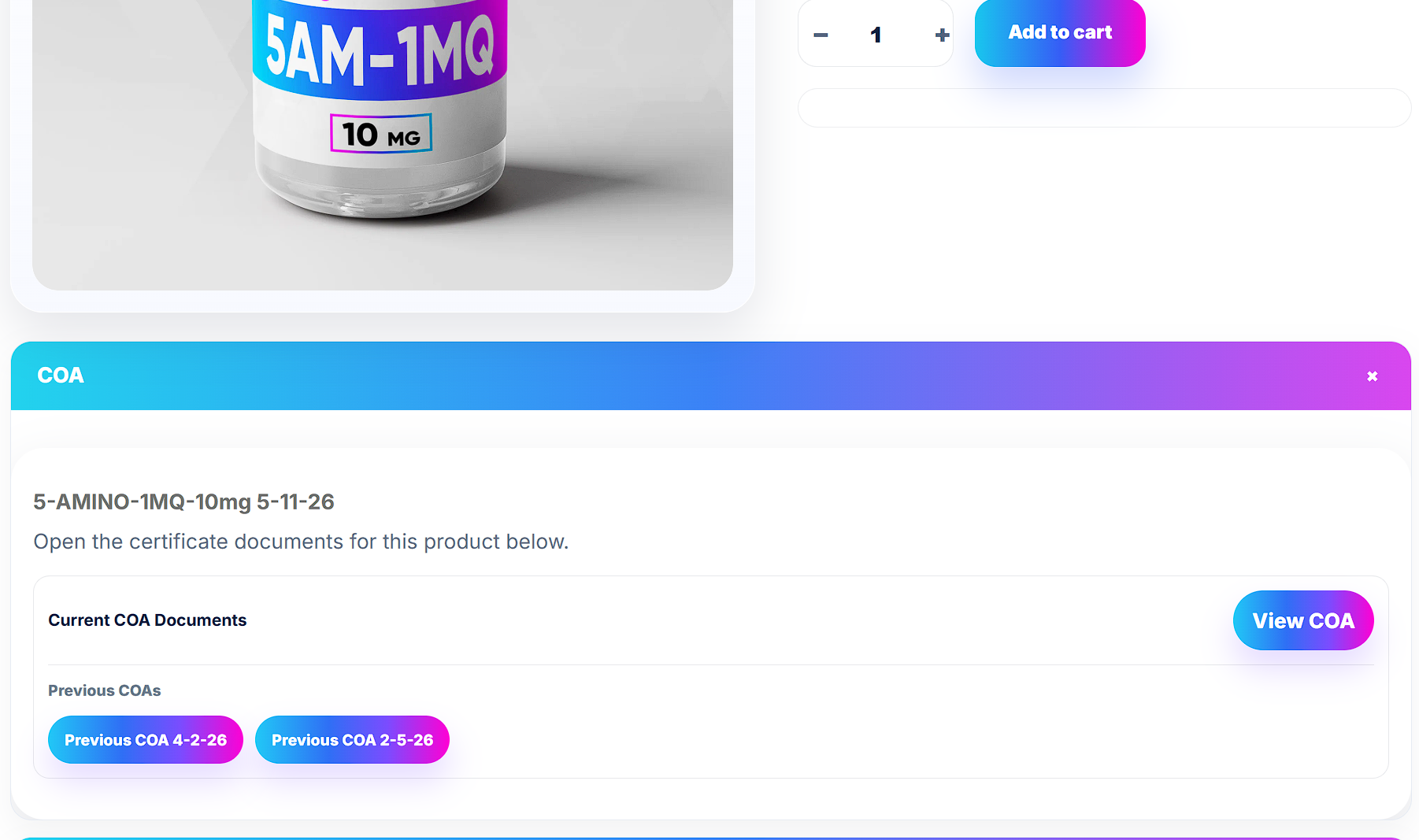
COAs should strengthen the product page, not feel like a forgotten file dump.
Product documents can help a peptide store feel more organized and serious when they are presented clearly. The page should not make customers hunt through a footer link, dig through media files, or wonder whether the document belongs to the product they are viewing.
A stronger setup can show the current COA near the purchase flow, include previous documents in a clean archive, and give the team a repeatable way to keep certificates current.
The display is only half the win. The matching workflow is what keeps it from becoming a mess again.
- Match certificate files to the correct WooCommerce product by naming rule, SKU, slug, product ID, strength, batch, or manual override.
- Show the newest certificate first while keeping previous COAs available when needed.
- Create a cleaner admin process for uploads, imports, missing matches, date handling, and product-page injection.
- Build the logic into a private plugin so the store is not depending on scattered snippets or theme edits.
This is not just a PDF button. It is product trust, admin workflow, document matching, and WooCommerce logic.
The best COA setup solves the business problem behind the file: customers want confidence, staff need speed, products need accurate matching, and the owner needs fewer broken document requests.
Built around WooCommerce products
The system can understand product IDs, SKUs, slugs, categories, variations, strengths, and product-page placement instead of acting like a generic document library.
Cleaner COA display on product pages
Display the current certificate in a branded trust block, tab, accordion, card, or custom location such as beneath the main product image.
File naming that actually works
We can structure the matching around the naming format your team can realistically follow, then build validation around it.
Date and lot visibility
Show COA dates, lot numbers, batch IDs, document labels, or custom metadata so the user sees more than a random PDF link.
Admin screens for the real workflow
Add upload, import, matching, status, and missing-document screens so staff can manage COAs without hunting through products one by one.
Search and lookup options
Build a customer-facing COA lookup page or internal support lookup so documents can be found without opening every product manually.
SEO-friendly service structure
The COA system can support trust and conversion while this page targets searches around peptide COA manager, peptide certificate system, and WooCommerce COA display.
Private plugin architecture
The logic can be packaged into a dedicated plugin so it survives theme changes and stays easier to maintain over time.
This is for peptide brands that are tired of fighting COA uploads manually.
If your product documents are scattered, outdated, ugly, hard to find, hard to update, or constantly creating support questions, a custom COA system is probably worth building.
You should consider a custom COA system if…
- Your COA links are buried in product descriptions.
- Your team manually edits products every time a new file arrives.
- Customers ask where the COA is or whether it is current.
- Your file names do not consistently match the correct product.
- You need dates, lot numbers, or batch data visible on the product page.
- You want a searchable COA lookup instead of static PDF links.
- You want the logic in a private plugin instead of fragile snippets.
Search terms this page is built to satisfy
Peptide COA system, peptide COA manager, peptide certificate of analysis plugin, WooCommerce COA display, peptide product COA display, peptide document manager, COA lookup page, batch COA lookup, peptide lab report display, WooCommerce product documents, custom COA plugin, and peptide website document system.
Supporting articles can target narrower problems like COA file naming, product-page COA placement, WooCommerce document lookup, and batch-based certificate display.
From messy documents to a controlled COA workflow.
Audit the current mess
Review how COAs are named, uploaded, linked, matched, displayed, and updated inside the current WordPress store.
Define the matching rules
Decide whether files should match products by SKU, slug, name, strength, batch, date, manual selection, or a hybrid rule.
Build the plugin system
Create the admin workflow, product-page display, lookup logic, and import behavior the business actually needs.
Test with real products
Check desktop, mobile, product pages, missing files, old files, new uploads, lookup behavior, and customer-facing display.
Questions peptide brands usually ask before building a COA manager.
Is this just a document library?
No. A generic document library stores files. A custom peptide COA system can connect documents to WooCommerce products, show product-specific certificates, handle dates and batches, support lookup, and give admins a repeatable workflow.
Can COAs show on product pages?
Yes. The display can be placed under the product image, inside a tab, near the purchase area, in an accordion, or in a custom trust section depending on the store layout.
Can it support batch numbers and dates?
Yes. The system can support visible COA dates, lot numbers, batch IDs, document labels, upload dates, and latest-file priority depending on how your team organizes files.
Can files be imported in bulk?
Yes. Bulk import can be built around a consistent naming format, ZIP upload workflow, admin validation screen, or manual fallback process.
Can customers search for COAs?
Yes. A searchable lookup page can let users search by product name, SKU, lot, batch, or other fields if those values are part of the document workflow.
Do you provide legal or compliance advice?
No. PeptideWP and BuildRightWeb provide website development, WordPress, WooCommerce, plugin, and implementation work. Your business should provide or approve the final legal and compliance language.
Build the COA system, then strengthen the rest of the store.
Custom Peptide Plugins
Private plugins for COA systems, access gates, checkout logic, dashboards, calculators, and peptide-specific workflows.
Custom peptide plugin development →Peptide RUO Gates
Custom login, create account, acknowledgement, opt-in, and restricted access flows for peptide research stores.
Peptide RUO access gates →Peptide WooCommerce Development
Product pages, checkout, account flow, cart behavior, payment logic, coupons, and store cleanup.
Peptide website and WooCommerce development →Need a custom peptide COA system for WordPress?
PeptideWP is the niche front door. BuildRightWeb handles the actual project intake, scope, quote, build, plugin structure, and implementation work.